
Get It Out of Your Head: Use AI to Write Simple Checklists and How-To Guides for Your Team
Holiday help starts soon, and every new person will ask how to open up, how to take an order and what to do when a customer is upset. The answers live in your head. AI can help you get them onto paper in an afternoon, in plain steps anyone can follow.
Key takeaways
Start with the tasks you explain over and over, like opening, closing and taking an order.
Talk the task through out loud once, then let AI turn your words into numbered steps.
Check every step yourself. AI can add steps you do not do or leave out the one that matters.
Test each checklist with someone new and fix whatever confused them.
You have explained how to close up the shop more times than you can count. Every new hire asks where the extra receipt paper is, what to do when the card reader freezes and who to call when a customer is upset. With holiday help starting soon, you are about to answer all of it again.
Written checklists fix that, and big companies call them SOPs, short for standard operating procedures. Most small business owners never write them because it takes too long. AI changes that. You talk a task through once, the AI turns your words into clear numbered steps and you fix what it got wrong. Here is how to do it, even if you have barely used AI before.
Start with the tasks you explain over and over
Do not try to write a manual for the whole business. Pick the tasks that cause the most questions or the most mistakes, and do those first.
Checklist
Good first checklists
Opening and closing for the day
Answering the phone and taking an order or booking
Handling a customer who is unhappy
Cleaning up at the end of a job or a shift
Restocking, ordering supplies or prepping for tomorrow
Posting a photo or update on your social pages
Not sure where to start? Keep a note for one week of every question you answer for your team. Or ask your newest employee which task confused them most. Either way, the list of checklists to write mostly makes itself.
Talk it out, then let AI tidy it up
Writing from scratch is the slow part. Talking is fast. Most people can explain a task out loud far more easily than they can write it down.
Four steps
Record yourself Walk through the task while you do it, or sit down and talk it through. Many phones and AI apps can turn a recording into text.
Paste it into an AI assistant Use the prompt below. ChatGPT, Claude and Gemini can all do this job.
Read every step Fix anything that is wrong, cut anything you do not do and add what you forgot to say.
Save it where the team will look A shared folder, a printed page at the station or a QR code on the wall that opens the guide.
〉 Try this prompt
Turn my notes below into a simple step-by-step checklist for a new employee at my [type of business]. Use ONLY what is in my notes. Do not add steps, rules or safety advice I did not mention. Write short numbered steps that start with an action word, plain English, and add a short "Watch out for" list at the end. Notes: [paste what you said].
Pro tip: Keep private things out
Do not paste customer names, alarm codes, passwords or bank details into an AI tool. Write "ask the manager for the code" in the checklist instead.
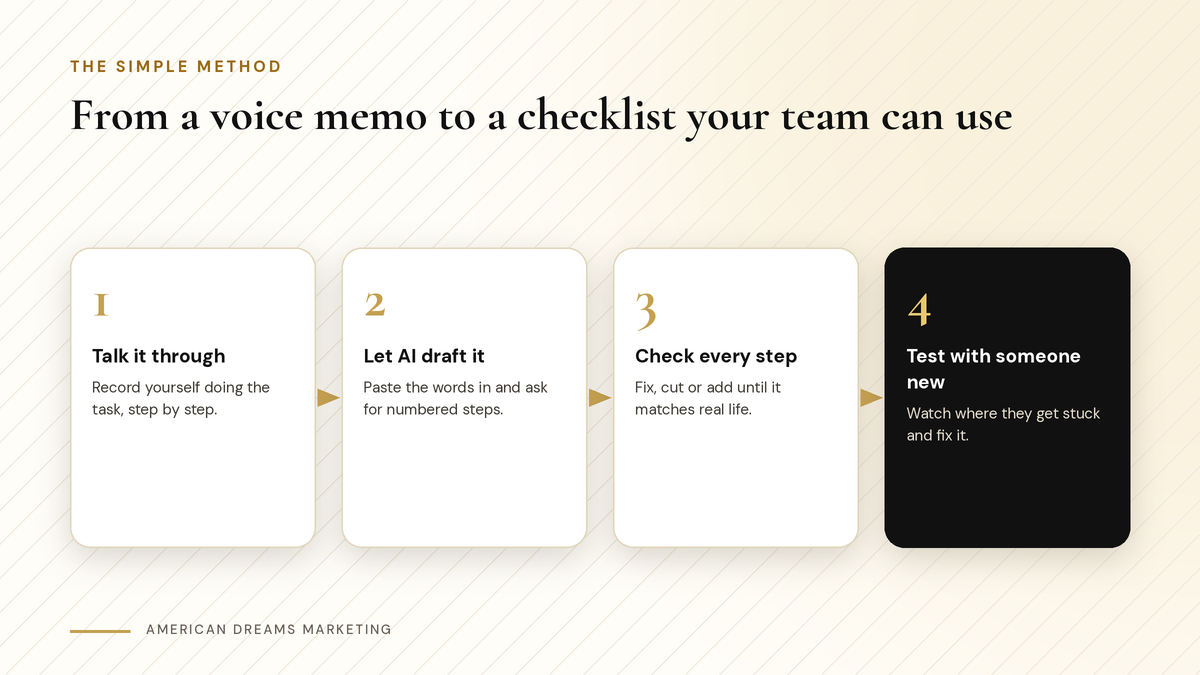
Talk it once, let AI draft it, check it yourself and test it with someone new.
Keep the format simple
One page is the goal. If it runs longer, split it into two checklists.
Part | What to include |
|---|---|
Title | The task, in plain words: "Closing the shop" |
When to use it | "Every night after the last customer leaves" |
The steps | Numbered, one action each, in the order you do them |
Watch out for | The two or three mistakes people make most |
Who to ask | The person to call or text if something goes wrong |
If a new person can follow it without asking you, it works.
Check it, then test it with someone new
AI is good at turning messy notes into neat steps. It is not good at knowing how your business really runs. It may add a step that sounds right but that you never do, or smooth over the one detail that matters most.
Heads up: Safety steps come from the real source
For anything involving food handling, chemicals, ladders, electrical work or other safety issues, check the steps against the manufacturer's instructions and the rules that apply to your business. Do not rely on an AI draft for those.
Then hand the checklist to someone who has never done the task and watch. Every time they pause or ask a question, that step needs work. Fix it and try again. A round or two of this catches most of the gaps.
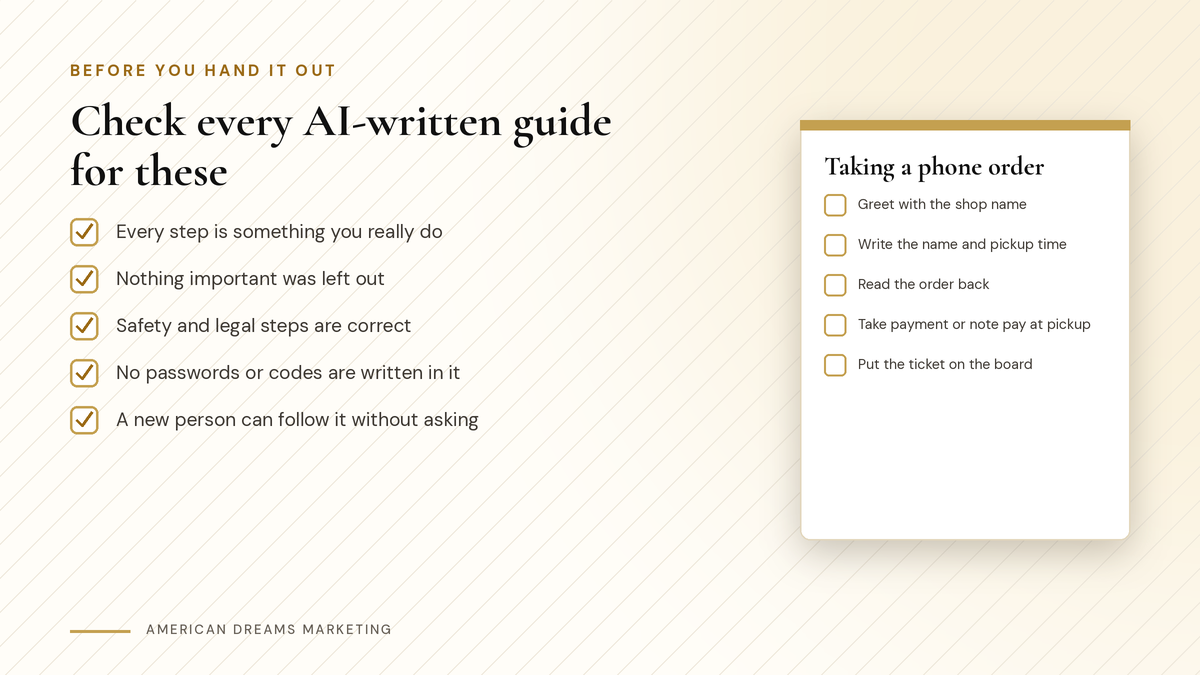
Five checks before any AI-written guide goes to your team.
Keep it current
Review each checklist when the season changes, or whenever you change how you do something.
Ask your team what is missing. The person doing the task every day knows.
Print the ones used at a station and keep a digital copy that is easy to update.
Use AI again for updates. Paste in the old checklist and your changes, and ask for a clean new version.
Brand new to AI? The 7-Day AI Quick-Start ($12) is a one-lesson-a-day plan that walks you through the basics in a week, so prompts like the one above start to feel natural. If your business already runs on Gmail and Google Docs, Gemini for Beginners ($19.99) covers Gmail and Docs workflows, and our post Gemini for Beginners: Put Google's AI to Work in Your Gmail, Docs and Sheets is a good place to start.
Want AI working in other parts of your business, like answering calls or texting back missed callers? Book a free discovery call and we will show you what the American Dreams platform can take off your plate.
Frequently asked questions
What is an SOP for a small business?
An SOP, or standard operating procedure, is a written set of steps for a task you do often, like opening, closing or taking an order, so anyone on your team can do it the same way.
Can AI write SOPs for my business?
AI can turn your notes or a recording into a clean, numbered checklist. You still need to check every step, because it does not know how your business really runs.
Which AI tool is best for writing checklists?
ChatGPT, Claude and Gemini can all turn notes into checklists. The notes you give it and the checking you do matter more than the tool.
How long should an SOP be?
One page is a good goal. If a task needs more than that, split it into two or more shorter checklists.
What should I never put in an AI tool?
Customer names and details, passwords, alarm codes and bank information. Write "ask the manager" in the checklist instead.
How do I get my team to use the checklists?
Keep them short, put them where the work happens, ask the team to help fix them and update them when things change.
Put AI to work in your business
American Dreams Marketing helps small businesses use AI where it saves real time, from answering calls and texting back missed callers to follow-up that runs on its own on the American Dreams platform. Book a free discovery call to see what fits.
