
Show Up in the Towns You Actually Serve: A Simple Guide to Service Area Pages
You drive to the next county for jobs every week, but your website only mentions the town on your business card. Search tools and AI assistants read your site to figure out where you work. Service area pages tell them, as long as each page is real and useful.
Key takeaways
Make a page only for towns you really serve and want more work in.
Each page needs real local details: jobs you have done there, photos, local questions and reviews from that area.
Do not copy one page and swap the town name. That kind of page can do more harm than good.
Home-based business? Show your service area and keep your home address off the site.
You cover a whole region. Last week you had jobs in three different towns and drove past two more on the way. But your website says one thing: your home town, once, in the footer. When someone two towns over searches for what you do, nothing on your site tells search tools you go there.
Service area pages fix that. They are simple pages on your website, each one about the work you do in one town or area. Done well, they help the right people find you and give them a reason to call. Done badly, as copy-paste pages with the town name swapped, they can hurt more than they help. Here is how to do them well.
Why one homepage is not enough
Google says local results are based mainly on three things: relevance (how well you match the search), distance and prominence (how well known you are). You cannot change the distance. You can make your website more relevant by saying, clearly and honestly, what you do and where you do it.
Good to know: Your profile and your site do different jobs
Your Google Business Profile service area tells Google where you go. Your website explains the work, shows proof and answers questions. Service area pages connect the two by showing what you do in each place.
AI assistants that answer local questions work in a similar way. They read websites to understand who serves where. A clear page about your work in a town is easy for them to understand and point people to.
Pick the towns worth a page
Look back at your jobs from the past year and note the towns they came from. That list, plus the places you would like to grow into, is your starting point. Be honest about distance. A page for a town you rarely get to only brings in calls you will have to turn down.
Checklist
Good candidates for a service area page
Towns where you have already done real jobs
Towns where you want more work, and can get there reliably
Places big enough that people search by the town name
Neighborhoods or parts of a city, if you work in a large one
Areas your best customers come from
Pro tip: Start with a few great pages
A few pages with real details beat a long list of thin ones. Add more towns once the first pages are done and you have photos and reviews to share from those areas.
What goes on a good service area page
The building blocks
A clear headline Name the service and the town, the way people search for it: "Gutter cleaning in [town]."
Local details Neighborhoods you work in, the kinds of homes or businesses there and the problems you see most in that area.
Real jobs and photos A few recent jobs in that town, with photos you have permission to share.
Reviews from that area Real reviews from customers in or near that town, exactly as they wrote them.
Local questions Questions people there ask you, answered in plain words.
One next step A quote form, a booking button or a way to message you.
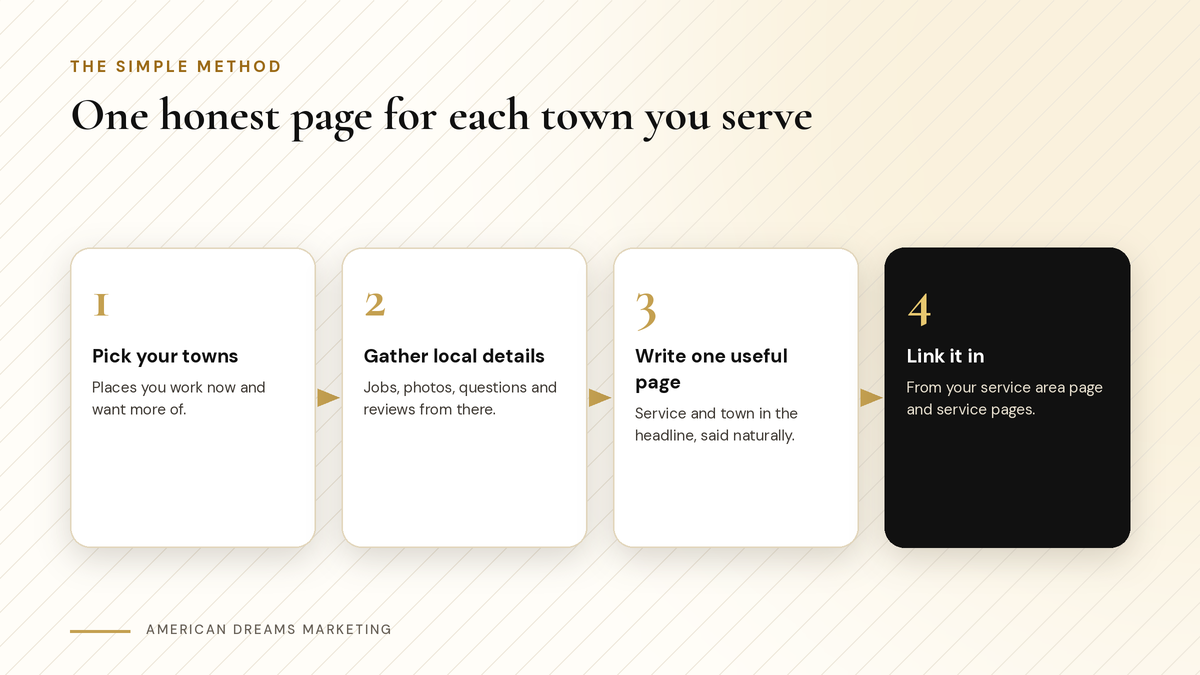
Pick the towns, gather real details and write one useful page for each.
Heads up: Avoid copy-paste town pages
Google's spam policies warn against doorway pages: lots of near-identical pages made only to rank for different places. If the only thing that changes from page to page is the town name, rewrite it or leave that town out.
Connect the pages to the rest of your site
Add a Service Areas page that lists each town you have a page for and links to it.
Link each town page to your service pages, and back, so people can move between them.
Keep your business details the same everywhere: name, phone number, website and hours.
Update the pages when you finish a good job in that town. A fresh photo and a short note keep the page useful.
Home-based business? Show your service area, not your street address. Your Google Business Profile can hide your address and show only the areas you serve.
Your Google Business Profile matters just as much as your website for these searches. Here is how to set up your Google Business Profile for local search.
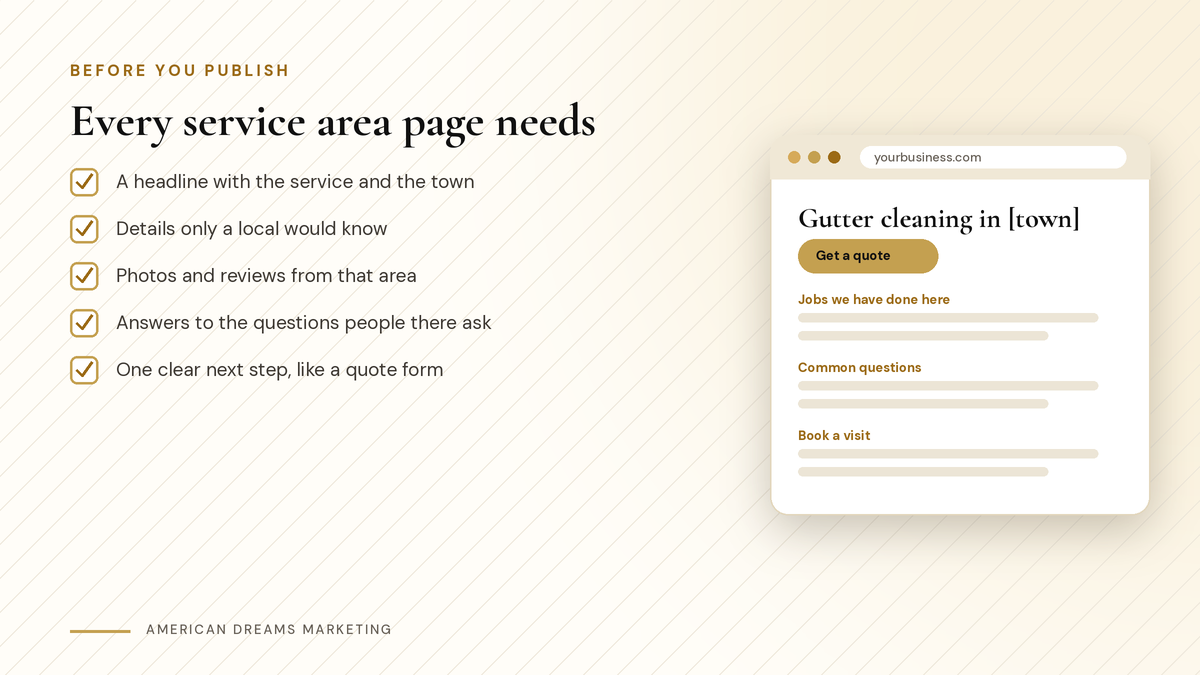
Five things every service area page should have before it goes live.
Use AI for a first draft, not the facts
AI writing tools can help you outline a page or turn your notes into clean paragraphs. They cannot know which streets you work on or which jobs you did last month. Give them your real notes and edit the result so it sounds like you.
〉 Try this prompt
Help me write a service area page for my [type of business] in [town]. Use ONLY these notes: [jobs we did there, neighborhoods, common problems, real customer questions]. Do not invent reviews, prices, licenses or results. Plain, friendly English, short paragraphs, a headline with the service and the town, and end with: [your call to action].
A page about your work in a town should only make sense for that town.
Want a website that covers every town you serve? Through Nov 15, American Dreams Marketing has a holiday website special: websites starting at $1,500, with Google setup and QR code customer capture included. It is limited to 5 spots. Book a free discovery call and we will plan your service pages and town pages together.
Frequently asked questions
What is a service area page?
It is a page on your website about the work you do in one town or area, with local details, photos, reviews and a clear way to get a quote or book.
Do service area pages help with near me searches?
They can make your site more relevant for searches in those towns. Google says local results depend mainly on relevance, distance and prominence, and clear pages help with relevance.
How many service area pages should I make?
Start with a few towns where you already work and want more jobs. A few pages with real details are better than many thin ones.
Can I copy the same page and change the town name?
No. Near-identical pages made only to rank in different places are what Google calls doorway pages. Each page should have details that only fit that town.
Should a home-based business list its address?
No. Show your service area instead. Your Google Business Profile can hide your street address and show only the areas you serve.
Can American Dreams Marketing build my service area pages?
Yes. Our holiday website special runs through Nov 15: websites starting at $1,500, with Google setup and QR code customer capture included, limited to 5 spots.
Get found in every town you serve
American Dreams Marketing builds websites with service pages and town pages on the American Dreams platform. Through Nov 15, websites start at $1,500 with Google setup and QR code customer capture included, limited to 5 spots. Book a free discovery call to claim yours.
