![One-star review card reading Never been here, signed [Reviewer], with a gold flag icon and a Reported status pill](https://images.leadconnectorhq.com/image/f_webp/q_80/r_1200/u_https://assets.cdn.filesafe.space/Dh5JzXc3RwJ18TWQYWXG/media/6ad762dcd13d88c0c8235a0f.png)
How to Report a Fake Google Review | ADM
Google takes down reviews that break its rules, not reviews that are just harsh. Here is how to tell the difference, report the right way, track your request and reply calmly while you wait.
Key takeaways
Check your job history and messages before you decide a review is fake.
Report each review once, from Maps, Search or your Business Profile, and pick the closest reason.
Track the request in Google's Reviews Management Tool and appeal if it is not accepted.
Reply in public with a short, calm note. A person writes it, not a bot.
You open your Google Business Profile and there it is: a one-star review from someone you have never met. No job, no visit, no name in your records. It stings, and it is tempting to fire back. Take a breath. There is a calm way to handle it.
Here are the steps: check your records, report the review the right way, track the request and reply in public while you wait. One simple rule runs through all of it: a person (you or a trusted team member) reports and replies on your Google profile, not a bot.
Fake, unfair or just harsh?
Google removes reviews that break its policies for user content. That covers fake engagement, off-topic or spam content, conflicts of interest, harassment, hate speech, offensive content and personal information. Google does not remove a review just because it is negative or because you disagree with it.
So the question is not "Is this review mean?" It is "Does this review break a rule?"
General guide only. Google makes the final decision on every report.
Situation | Likely breaks policy? | What to do |
|---|---|---|
Someone who was never a customer, no visit on record | Likely, as fake engagement | Report it and reply calmly |
Spam, ads or a review about another business | Likely, as spam or off-topic | Report it |
Insults, threats or hateful language | Likely, as harassment or hate speech | Report it, do not engage |
Shares someone's private details | Likely, as personal information | Report it quickly |
A real customer who is unhappy, even if harsh | Probably stays up | Reply and offer to make it right |
Step 1: Check your records first
Before you call a review fake, make sure. People often use a nickname, a spouse's account or a business name on Google. A review that looks fake can turn out to be a real job from last spring.
Checklist
Look in these places
Your job history, appointments and invoices for the name or date.
Texts, emails and messages from around that time.
Your team. Ask whoever worked that week.
The review itself, like a service you do not offer or a town you do not serve.
If you find the customer, treat it as a real complaint and reply to fix it. If you find nothing, move to step 2.
Step 2: Report it the right way
You can report a review from Google Maps or Search, or from the reviews in your Business Profile.
Open the review Find it in Google Maps, Search or your Business Profile reviews.
Open the menu Tap the three-dot menu next to the review and choose Report review.
Pick the closest reason Choose the policy that fits best, such as fake engagement, off-topic, conflict of interest or harassment.
If your reviews come into the American Dreams platform, you can start there too. Open the review in the conversations area and choose "Dispute this review." That opens Google's own flow to report it.
Pro tip: Report each review once
One clear report with the right reason is enough. Do not keep reporting the same review, and do not ask friends, family or staff to report it too.
Good to know: Legal concerns are a separate path
Google has a separate process for legal removal requests. If a review may be defamatory, talk to an attorney first.
Step 3: Track the request and appeal if needed
After you report, use Google's Reviews Management Tool to check the status of reviews you reported. If Google did not accept a request, the same tool lets you file an appeal. Appeal once, with a short, clear reason.
On the American Dreams platform, the dispute option also opens a status view of each review you reported, with a way to appeal if the takedown request was not accepted.
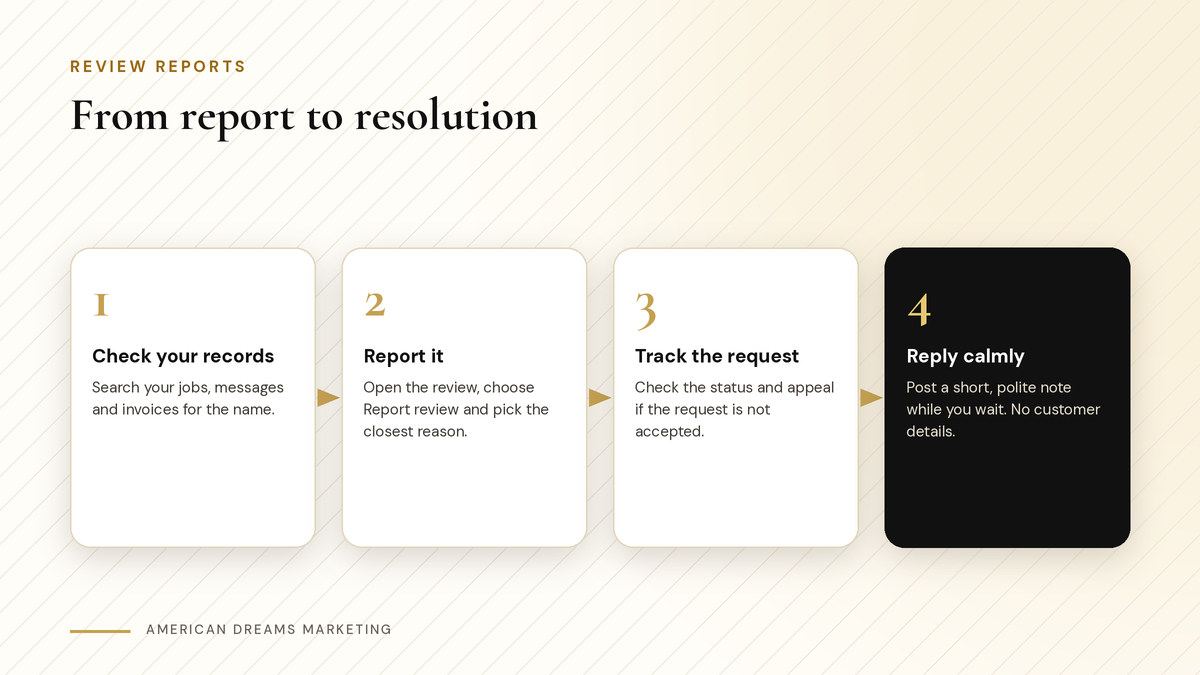
Check your records, report it once, track the request and reply calmly while Google reviews it.
Step 4: Reply in public while you wait
The review stays up until Google decides, and future customers read your reply as closely as the review. So post one. Keep it calm and short. Do not share customer details, and do not accuse anyone.
〉 Sample reply
Hi [Name], we take every review seriously. We could not find a visit under this name. Please contact us at [email] so we can look into it. [Your Business]
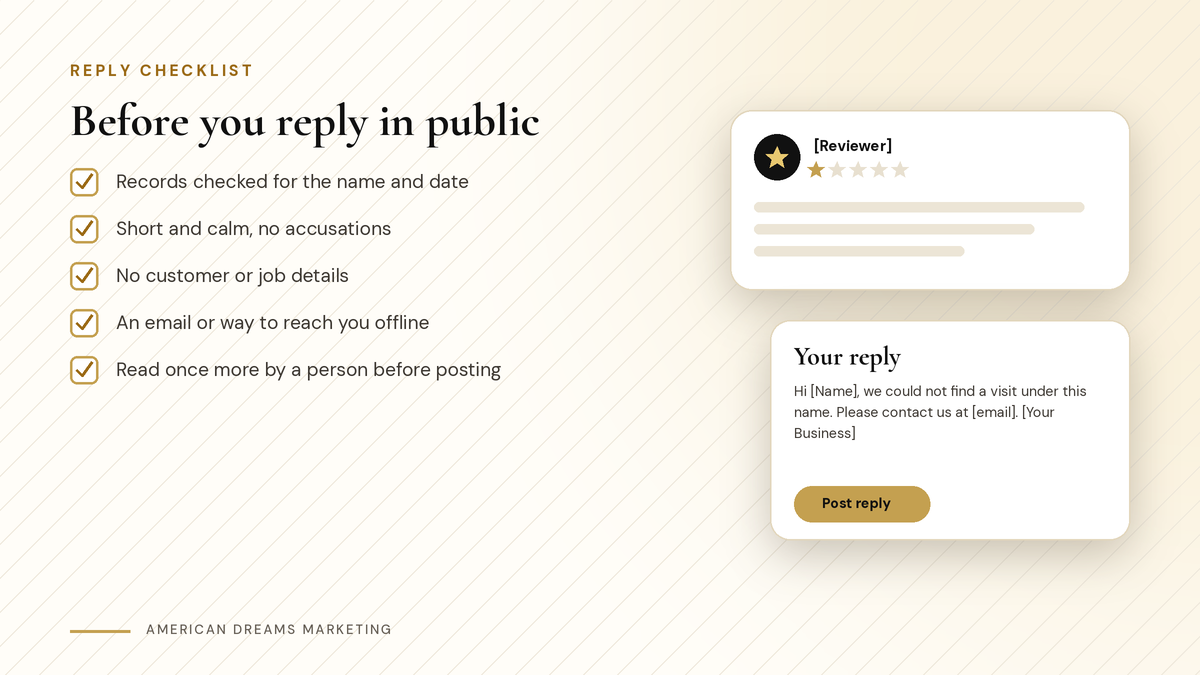
Run through this list before any reply goes live.
The Reputation dashboard on the American Dreams platform shows reviews from Google, Facebook and other connected sites in one place, so you can reply without switching sites. It can suggest AI replies, but a person reads and edits each one before posting. More on that in AI Replies to Google Reviews: How to Answer Politely (and When a Human Should Take Over).
There is also spam detection: an automatic setting under Reputation, Settings, Spam Reviews, plus a "Mark as Spam" action, a spam filter and "Undo Spam." AI reply suggestions skip reviews marked as spam. Marking a review as spam there does not remove it from Google; it keeps it out of your reply queue.
What not to do
Do not argue in the reply or start a back-and-forth.
Do not post fake positive reviews to bury the bad one.
Do not offer rewards for removing a review or for leaving one.
Do not ask friends to report the review.
Never pay anyone who offers to remove reviews.
The FTC's consumer review rule that took effect in 2024 bans fake reviews and misleading review practices. Playing it straight protects you.
Heads up: If someone demands money to remove reviews, do not pay
If anyone offers to take down reviews for a fee, or threatens more bad reviews unless you pay, do not pay. Save the message and report it to Google.
Step 5: Keep genuine reviews coming
The best answer to one unfair review is a steady flow of real ones, so a single bad review carries less weight. On the American Dreams platform, review requests go out by text and email after a job. Here is how that works: How Small Businesses Get More Google Reviews Without Awkwardly Asking Every Customer.
Want help setting up your Reputation dashboard and review requests? Book a free discovery call and we will walk through it with you.
Frequently asked questions
Can I get a fake Google review removed?
Sometimes. Google removes reviews that break its policies, such as fake engagement, spam, conflicts of interest, harassment or personal information. Report it once, pick the closest reason and check the status in the Reviews Management Tool.
Will Google remove a negative review that is unfair?
Not just because it is negative or because you disagree. If a real customer left it, reply politely, keep details private and invite them to contact you so you can try to make it right.
What if someone who was never a customer left a review?
Check your job history, messages and team first, since people use nicknames or a family member's account. If you find no record, report it as fake engagement and post a short, calm reply.
How do I check the status of a review I reported?
Use Google's Reviews Management Tool. It shows the reviews you reported and their status, and lets you appeal if a request was not accepted. The dispute option on the American Dreams platform opens it too.
Should I reply to a fake review?
Usually, yes. A short, calm reply shows future customers you care. Say you could not find a visit under that name and give an email to reach you. Never argue, accuse or share customer details.
Can American Dreams Marketing set this up for me?
Yes. We connect your Google and Facebook reviews to the Reputation dashboard on the American Dreams platform, turn on spam detection, set up text and email review requests after each job and show your team the dispute flow.
Handle every review with a clear plan
We set up your Reputation dashboard, spam detection and review requests on the American Dreams platform, so you and your team can reply, report and keep real reviews coming in.
