![Gold maintenance plan card reading [Your Business], Maintenance plan, $[amount], Every [month], inside a circular arrow with a small calendar tag](https://images.leadconnectorhq.com/image/f_webp/q_80/r_1200/u_https://assets.cdn.filesafe.space/Dh5JzXc3RwJ18TWQYWXG/media/6ad762deb212bcb9dcc081e4.png)
Maintenance Plans and Recurring Billing Explained | ADM
A maintenance plan keeps happy customers coming back on a schedule, with the invoice and payment handled for you. Here is how to set one up before the new year.
Key takeaways
Build the plan around a visit schedule your customers already need.
Write down what is included, what costs extra and how to pause or cancel.
Get the customer's OK in writing before you bill them on a schedule.
Recurring invoices with auto-pay send the bill and charge the saved card for you.
You fixed the furnace, cleaned the gutters or treated the yard, and the customer was happy. Then you never heard from them again. A maintenance plan changes that. The customer pays on a schedule, you show up on a schedule, and nobody has to remember to call.
This guide is for HVAC, lawn care, pool, pest control, cleaning, detailing, pressure washing, gutter and IT service owners who want steady, repeat work.
What a good maintenance plan includes
Strong plans are built around work the customer already needs: a fall furnace tune-up, weekly pool care, mowing every week or two. Start there, then add an extra that makes the plan worth it, like priority booking.
Start with one or two plans. More tiers just make people stop and think.
Examples only. Use your own plan names, services and prices.
Plan name | What is included | How often | Price |
|---|---|---|---|
Comfort Plan (HVAC) | Spring cooling check and fall heating check | Twice a year | $[amount] per month |
Green Season Plan (lawn) | Mowing, edging and cleanup of clippings | Weekly in season | $[amount] per month |
Clear Water Plan (pool) | Water testing, cleaning and filter check | Weekly in season | $[amount] per month |
Home Shield Plan (pest) | Outside treatment and a check of entry points | Every [number] months | $[amount] per visit |
Fresh Home Plan (cleaning) | Standard clean of [rooms] | Every two weeks | $[amount] per visit |
Tech Care Plan (IT) | Updates, backup checks and help desk time | Monthly | $[amount] per month |
Write the plan down in plain words
A plan only works if the customer knows exactly what they are paying for. Put it on one page, in plain words, and give it to every customer before they sign up.
Checklist
What your plan sheet should say
What is included, and what is not.
The visit schedule.
What costs extra, like parts or repairs.
How to pause or cancel.
When the card is charged, and how much.
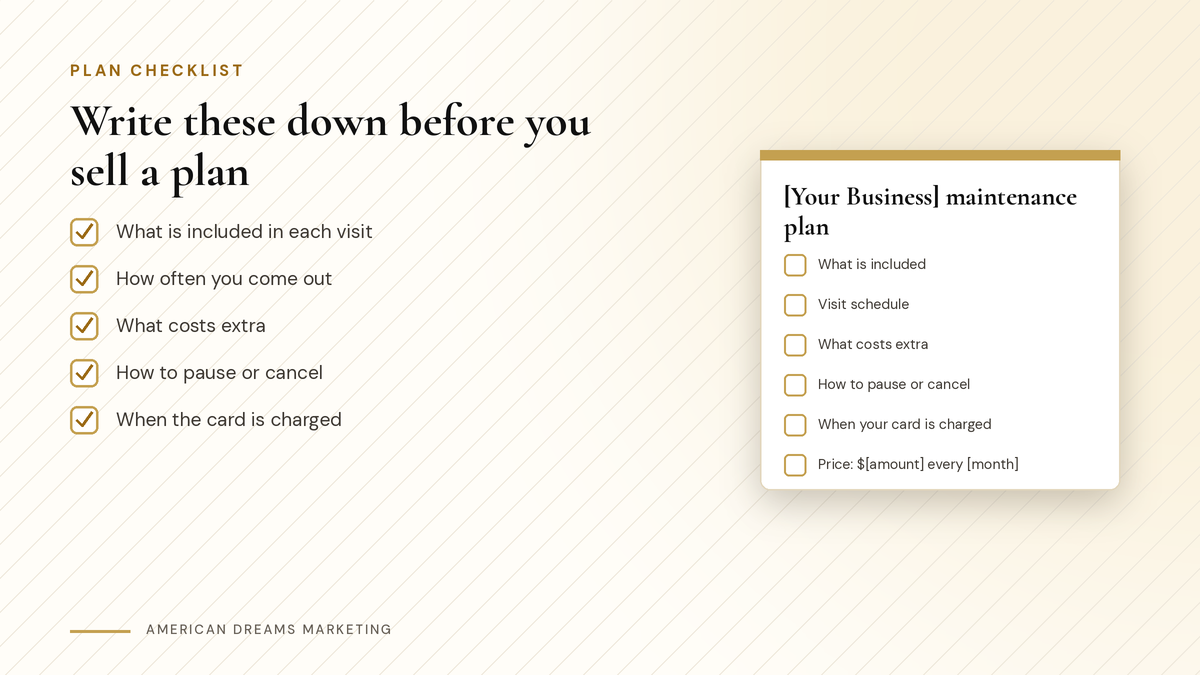
Put these five things on one page before you offer a plan.
Heads up: Get the OK in writing first
Before you bill anyone on a schedule, get their agreement in writing, such as a signed plan sheet or terms they accept when they pay. Check your state's rules on automatic renewals and keep cancellation simple. This is general advice, not legal advice.
How recurring billing works on the American Dreams platform
Set up a recurring invoice once and it goes out on its own:
Build the invoice once Pick the customer, then add services, price, taxes and quantities.
Choose how often Daily, weekly, monthly, yearly or custom. Set a start date and an end date or number of invoices.
Send it a little early It can go out a few days before the due date.
Add the extras you need Terms and conditions, late fees, tipping, attachments, and processing fees if enabled.
Turn on auto-pay The customer's card is charged on each due date.
Pro tip: Check everything while it is a draft
Frequency, price and taxes cannot be changed once a recurring invoice is active or scheduled. Double-check all three before you turn it on.
Have a first visit, like a deep clean or system checkup? Add a one-time setup fee to the recurring product. It shows on the first invoice only, then the customer pays the regular price.
You can also sell a plan with a payment link. One link can combine one-time items, like that first visit, with one recurring plan. For more on links, see Text a Payment Link and Get Paid Without Chasing: Invoices That Customers Actually Pay.
Cards on file and auto-pay
For auto-pay, you choose which card to charge:
The card the customer first uses to pay an invoice in the schedule. Auto-pay starts with the next invoice.
A card already saved on their profile. Auto-pay starts with the first invoice.
A new card you add while setting up the invoice.
Cards are saved from the contact's payments area, including in the mobile app. Only the last digits and expiry show. Card data is not stored in the platform. It is fetched from your payment provider.
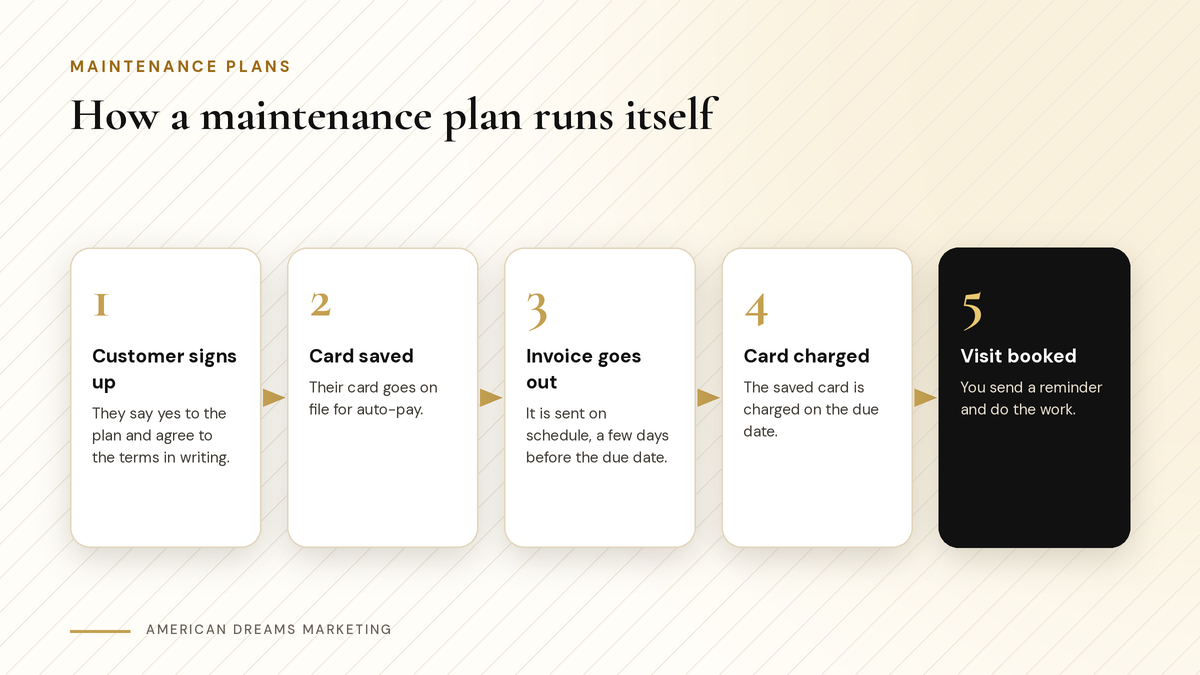
Once the card is saved, billing runs on schedule.
Working from the truck? See Run Your Business From Your Phone: Leads, Messages and Payments in One App for how to handle payments on the go.
Pausing, changing and canceling plans
The subscriptions page shows every plan with the customer, amount, status and payments in one place. From there, eligible subscriptions can be updated, paused, resumed or canceled. What you can do depends on your payment provider.
Update a plan: add or remove items with the same billing frequency, change the quantity or change the end date. Changes start with the next billing cycle.
Pause a plan indefinitely or until a set date, then resume it.
Cancel a plan when the customer is done.
Make pausing easy. Many seasonal customers would rather pause than quit, and a paused customer is still your customer.
What happens when a card fails
Cards expire. When a charge fails, both your team and the customer are notified, and the customer automatically gets an invoice to pay or add a new card.
You can also set retries. For supported processors, the system tries again up to 3 times, with gaps of 1, 3, 5 or 7 days that you choose. If all retries fail, you decide whether the subscription stays unpaid or is canceled.
Pro tip: Check failed payments once a week
Pick a day, open the subscriptions page and look for anything unpaid. A quick, friendly text often fixes it before the next visit.
When to offer the plan, and how to keep it running
Offer a plan right after a good job, while the customer is happy. The end of a season works too. Right now, before the new year, is a good time to offer plans that start in January or before spring.
〉 Sample offer text
Hi [First Name], thanks for choosing [Your Business] today. Want us to handle this every [season]? Our [plan name] is $[amount] per [month], and you can pause anytime. Details: [link]
Once they sign up, send a reminder before each visit with the [date] and [time].
Want help setting up your plans, recurring invoices and auto-pay? Book a free discovery call and we will walk you through it.
Frequently asked questions
How do I set up recurring payments for my small business?
Create a recurring invoice once with the customer, services, price and taxes, then choose how often it repeats and when it starts and ends. Turn on auto-pay so the saved card is charged on each due date.
What should an HVAC maintenance plan include?
A typical HVAC plan covers a spring cooling check and a fall heating check, often with priority booking. Write down what is included, what costs extra, the visit schedule, when the card is charged and how to cancel.
Can I charge a one-time setup fee on a maintenance plan?
Yes. A recurring product can carry a one-time setup fee that shows on the first invoice only. After that, the customer pays just the regular plan price on each invoice.
What if a customer's card fails?
You and the customer are both notified, and the customer gets an invoice to pay or add a new card. You can set up to 3 retries and choose what happens if they all fail.
Can customers pause their plan for the winter?
Yes, if your payment provider supports it. Eligible subscriptions can be paused indefinitely or until a set date, then resumed. Easy pausing helps you keep seasonal customers instead of losing them.
Can American Dreams Marketing set this up for me?
Yes. We set up your recurring invoices, auto-pay, setup fees, plan payment links and failed payment retries on the American Dreams platform, and show you how to pause, update or cancel plans from the subscriptions page.
Turn this season's jobs into next year's plans
We set up recurring invoices, auto-pay, setup fees and plan payment links on the American Dreams platform, so your maintenance plans bill on schedule and your customers know what to expect.
