![Gold holiday coupon ticket reading [Your Business], Holiday offer, Code: HOLIDAY, $[amount] off, with a calendar tag for Nov 27 to Nov 30](https://images.leadconnectorhq.com/image/f_webp/q_80/r_1200/u_https://assets.cdn.filesafe.space/Dh5JzXc3RwJ18TWQYWXG/media/6ad762dc436f78fefbbb8c4d.png)
Holiday Coupon Codes for Small Businesses | ADM
A coupon code is an easy holiday offer to run, as long as customers can find it, type it and see the savings. Here is how to set one up before Black Friday on Nov 27.
Key takeaways
Run one simple offer per holiday, tied to a real service or product.
Use a short code, plain terms, a usage limit and an end date.
Test the code on your phone at checkout before you announce it.
Coupons work at checkout, in booking and on payment links, not on invoices or estimates.
Every holiday season, owners ask the same thing: how do I make a coupon code people will actually use? The answer is simple. One clear offer, one short code, plain terms, and a checkout that shows the savings the moment someone types it in.
This year, Black Friday is Friday, Nov 27, Small Business Saturday is Nov 28 and Cyber Monday is Nov 30. Whether you run a salon, boutique, detailing shop, cleaning company, studio or bakery, the steps below are the same.
Pick one simple offer per holiday
A common slip is running too many deals at once. Three codes, two tiers and a free gift sounds generous, but it can confuse people. Confused customers wait, ask your staff, or leave.
Pick one offer per holiday and tie it to something you already sell: a winter detail package, a holiday blowout, a deep clean before guests arrive. When the offer matches a real service, customers know exactly what they get.
Examples only. Use your own amounts and services.
Business | Offer idea | Why it fits |
|---|---|---|
Salon or studio | $[amount] off a holiday booking | Fills the calendar before parties |
Boutique | $[amount] off orders over $[amount] | Rewards a bigger gift order |
Detailer | A percentage off a winter package | Protects the car before winter roads |
Cleaner | $[amount] off a pre-holiday deep clean | Done before guests arrive |
Bakery | $[amount] off a holiday pre-order | Helps you plan holiday baking |
Write plain terms and a short code
Your terms should fit in one or two sentences: what the code covers, when it starts and ends, one use per customer, and whether it combines with other offers if that is your rule. If you cannot explain it at the counter in ten seconds, simplify it.
Keep the code short and easy to remember, like HOLIDAY[YEAR] or SATURDAY. Skip numbers that look like a percentage, because people will guess the amount before they read your terms.
〉 Sample terms
Holiday offer from [Your Business]: use code HOLIDAY[YEAR] for $[amount] off any [service] booked between [date] and [date]. One use per customer. Cannot be combined with other offers.
Pro tip: Write the terms once, use them everywhere
Put the same sentence on your website banner, emails, counter sign and social posts. When the wording matches, customers trust it and staff do not have to guess.
How to set up the coupon on the American Dreams platform
If your website, store or booking calendar runs on the American Dreams platform, coupons live under Payments, then Coupons.
Name it and create the code Add an internal name you will recognize, then type the code customers will use or press Generate. Letters and numbers only, no spaces, not case sensitive.
Choose the savings Pick a percentage off the total or a fixed dollar amount off.
Set the start and end With no end date, the code stays active until you turn it off, so always set one for a holiday offer.
Add usage limits Cap total redemptions, limit it to selected products (even specific prices or variants), and allow one use per customer.
Check recurring products For a membership or plan, choose whether the savings apply to every billing cycle or for a set number of months.
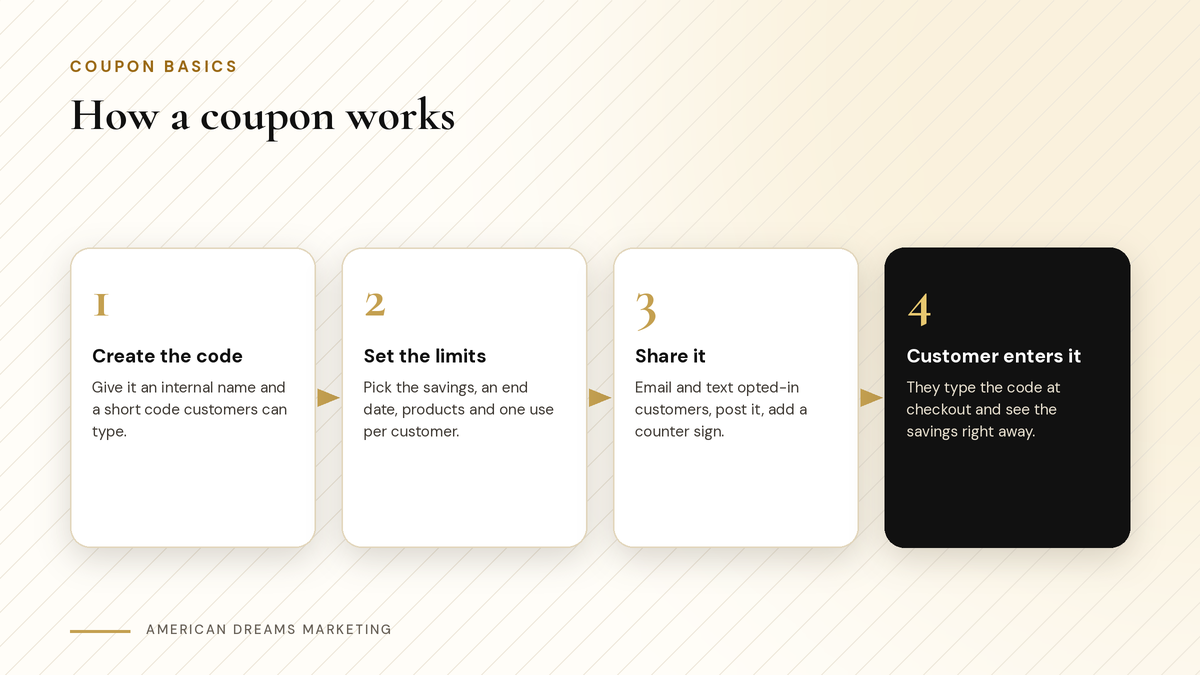
Create the code, set the limits, share it, and the customer enters it at checkout.
Good to know: You can edit it later
You can change the name, limits and dates after the code is live. Changes only affect future uses.
Where the code works, and where it does not
A coupon only helps if customers can enter it where they buy from you. On the American Dreams platform, codes work in:
Your online store, plus website and funnel order forms.
Payment links, once you turn on "Allow coupon codes" for that link.
Booking calendars, once you turn on Accept Payments and Enable Coupon Code for each calendar. The price updates as soon as the code is entered.
Services booking, events and the gift card sell page.
At checkout, the coupon box only shows when a valid coupon exists, and the order summary shows the savings. Booked appointments show the coupon line in their payments tab.
Heads up: Coupons do not work on invoices or estimates
If you bill some customers by invoice, plan another way to honor the offer, such as a payment link with coupons turned on. See Text a Payment Link and Get Paid Without Chasing: Invoices That Customers Actually Pay for how payment links work.
Test it on your phone and train your staff
Before you announce the code, test it yourself. Open your store or booking page on your phone, add an item, type the code and check the savings. Try it in lowercase. Then try a product the code should not cover.
Next, walk your staff through the terms: the code, what it covers, the end date and what to say if someone asks to stack it with another offer.
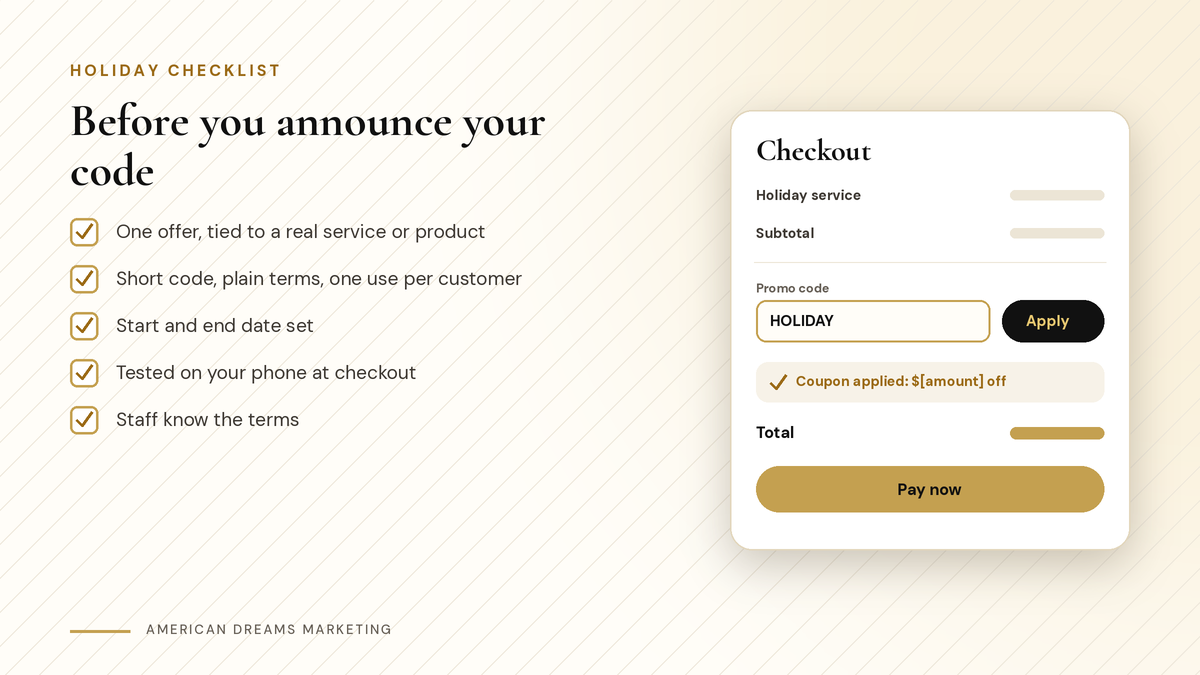
Run through this list before the code goes public.
Share the code with the right people
Send the code by email and text only to customers who opted in to hear from you. To reach people who have not visited in a while, see Win Back Past Customers Before the Holidays: Birthday, Seasonal and Database Reactivation Campaigns.
Checklist
Where to share your holiday code
Email and text to customers who opted in.
Your social media pages, with the terms in the post.
A counter sign with a QR code that opens your booking page or store.
A banner across the top of your website.
You can also set up automations. A workflow can start when a code is redeemed in a completed purchase, to send a thank-you, tag the customer or alert your team. Another can start when a code expires, to follow up with people who missed it.
After the season, look back and take notes
After the holidays, look at how many times each code was used. Note which offer people liked, which channel brought them in, and what you would change. Keep that note where you will find it next October.
Want help setting up holiday coupons, booking calendars and follow-up messages? Book a free discovery call and we will walk through it with you.
Frequently asked questions
How do I create a coupon code for my small business?
Pick one offer, write plain terms and choose a short code. On the American Dreams platform, go to Payments, then Coupons, enter or generate the code, choose the savings type, set dates and limits, then test it.
Should I use a percentage off or a dollar amount off?
Either works. A set dollar amount off is easy to understand at a glance, while a percentage off can suit bigger orders. Pick the one that fits your offer and stick to one per holiday.
Are coupon codes case sensitive?
No. On the American Dreams platform, codes are stored in uppercase and are not case sensitive, so a customer can type them in lowercase and they still work. Codes use letters and numbers only.
Can customers use a coupon code on an invoice?
No. Coupons do not work on invoices or estimates. For customers you normally invoice, send a payment link with coupon codes turned on instead, so they can still use the holiday offer.
What happens if I do not set an end date?
The code stays active until you turn it off. For a holiday offer, always set an end date and time so the code does not keep working into January.
Can American Dreams Marketing set this up for me?
Yes. We create your holiday coupon on the American Dreams platform, set the dates and limits, turn on codes for your booking calendars and payment links, and build the thank-you and expired-code follow-up workflows.
Get your holiday offer ready before Black Friday
We set up coupon codes, booking calendars, payment links and follow-up workflows on the American Dreams platform, so your holiday offer is easy to find and easy to use.
