![Email inbox card with a gold check mark reading Delivered to inbox, sent from mail.[yourbusiness].com, next to the post title](https://images.leadconnectorhq.com/image/f_webp/q_80/r_1200/u_https://assets.cdn.filesafe.space/Dh5JzXc3RwJ18TWQYWXG/media/6ad60ea331abbf1c24f5280d.png)
Why Your Business Emails Land in Spam (and How a Dedicated Sending Domain Helps)
You send a holiday promo, a round of reminders or a stack of invoices, and some land in spam. Usually the message is fine. The problem is how it was sent and whether inbox providers can tell it came from you.
Key takeaways
Send marketing email from your own domain, not a free Gmail, Yahoo or Outlook address.
SPF, DKIM and DMARC prove your mail is really from you.
A dedicated sending domain, like mail.yourbusiness.com, puts your brand on every email.
Warm up a new domain, keep your list clean and test with a separate inbox.
You send a holiday promo, a round of appointment reminders or a stack of invoices. Then someone says, "I never got it," and you find your email in their spam folder. Your message was fine. The problem is usually how it was sent and whether inbox providers can tell it really came from you.
Most of the fixes are one-time setup. Here is what causes it, what SPF, DKIM and DMARC do, how a dedicated sending domain helps and the habits that keep you out of the junk folder.
Why good emails end up in spam
Gmail, Yahoo and Outlook decide where every message goes. They check who sent it, whether the sender can prove it is really them, how people reacted to past emails and what the message looks like.
A free address. Marketing email sent as a gmail.com, yahoo.com or outlook.com address often fails checks, because those providers do not allow other servers to send as them.
No authentication. Missing SPF, DKIM or DMARC records.
A tired list. Old, bounced or unengaged addresses, or people who never gave clear permission.
Sudden volume jumps. Emailing your whole list out of nowhere.
Sketchy signals. Misleading subject lines, a missing from name or no unsubscribe link.
Bad tests. Sending from and to the same domain can look like spoofing.
Good to know: Shared servers can say "sent via"
By default, mail sent through shared sending servers can show "sent via" or "on behalf of" another server in the header, so it is not clearly tied to your brand.
SPF, DKIM and DMARC in plain English
These three records live in your domain's DNS settings. Together they help prove your email is really from you.
Gmail and Yahoo now expect bulk senders to authenticate their domain and make unsubscribing easy.
Record | What it does | Plain-English version |
|---|---|---|
SPF | Lists the servers allowed to send email for your domain | The guest list at the door |
DKIM | Signs each message so receivers can check it was not changed | A tamper seal on the envelope |
DMARC | Tells receiving servers what to do when checks fail (none, quarantine or reject) and can send you reports | Your instructions for handling fakes |
How a dedicated sending domain helps
A dedicated sending domain makes your email come from your own brand instead of a shared server. It is usually a sub-domain, like mail.yourbusiness.com or emails.yourbusiness.com. Here is the setup on the American Dreams platform.
Setting up a sending domain
Add the domain Go to Settings, then Email Services, then Dedicated Domain and IP, and click Add Domain.
Enter your sub-domain Type the sub-domain you want to send from.
Add the DNS records They can be set up automatically, or added by hand at your domain host. Only one DKIM record per domain is supported.
Verify DNS changes can take up to a day to show, so do this well before a big send.
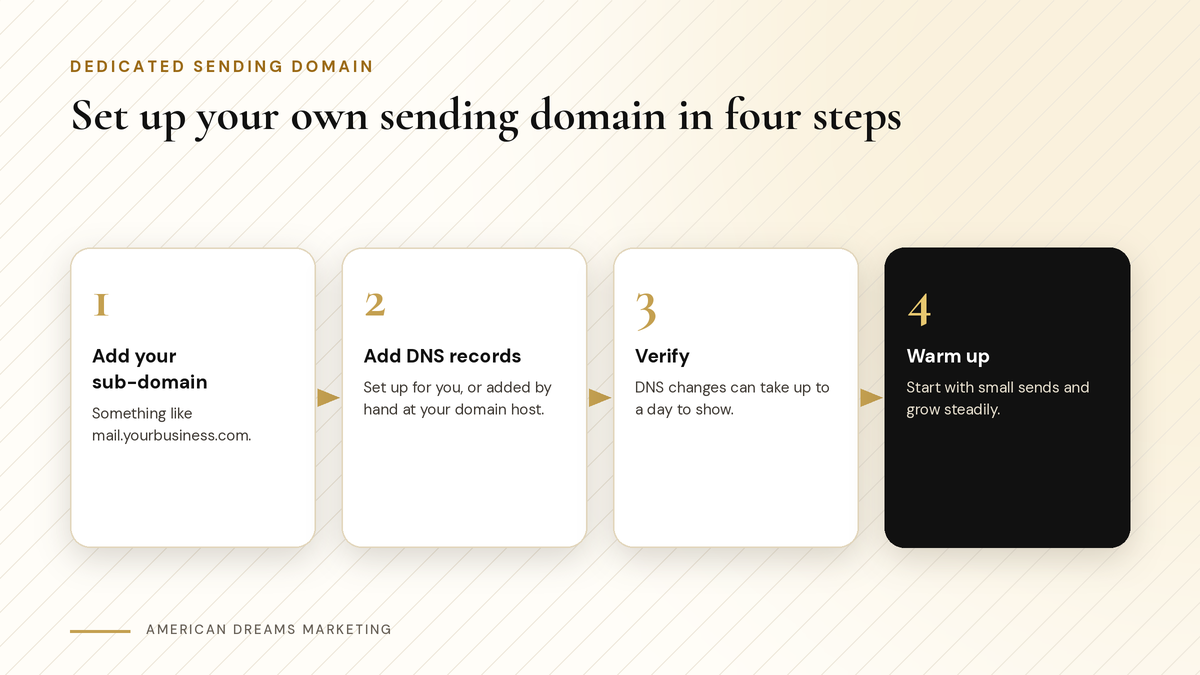
From a new sub-domain to a sending domain that is ready to use.
Heads up: Leave records you do not understand alone
Add only the records the setup asks for. Never delete your existing MX records. They route the email coming into your inbox. If you are not sure, ask whoever manages your domain.
You can also set up more than one sending domain and assign each to a type of email: one-to-one emails, workflow emails, marketing campaigns, invoice and payment emails, and calendar confirmations and reminders.
Warm up a new domain before the big list
A brand-new sending domain has no history, and a sudden spike looks like spam. Warm it up before you email a big list: start small and grow your volume steadily.
Send to your most engaged customers first.
Add more contacts a little at a time.
Watch bounces and complaints before you grow.
If holiday promos are coming, start weeks ahead, not the night before.
Planning holiday emails to past customers? Start here: Win Back Past Customers Before the Holidays: Birthday, Seasonal and Database Reactivation Campaigns. Get your sending domain warm before those campaigns go out.
List habits that keep you out of spam
Checklist
Good list habits
Only email people who gave clear permission
Remove addresses that bounce
Clean out contacts who have not opened in a long time
Use a real from name, like [Your Business]
Write subject lines that match what is inside
Keep an unsubscribe link in every marketing email
Pro tip: Let people leave the easy way
The list-unsubscribe header gives people an Unsubscribe button in Gmail and Outlook. Using it is a clean opt-out, not a spam complaint. It shows up once your sender reputation is good, so keep the link in the email too.
〉 Sample email footer
You are getting this because you are a customer of [Your Business] in [town]. Rather not hear from us? Click [link] to unsubscribe.
Test before your next big send
Before a big send, email a test to an inbox on a different domain than yours, like a personal Gmail. Check that it lands in the main inbox, the from name looks right and the links work.
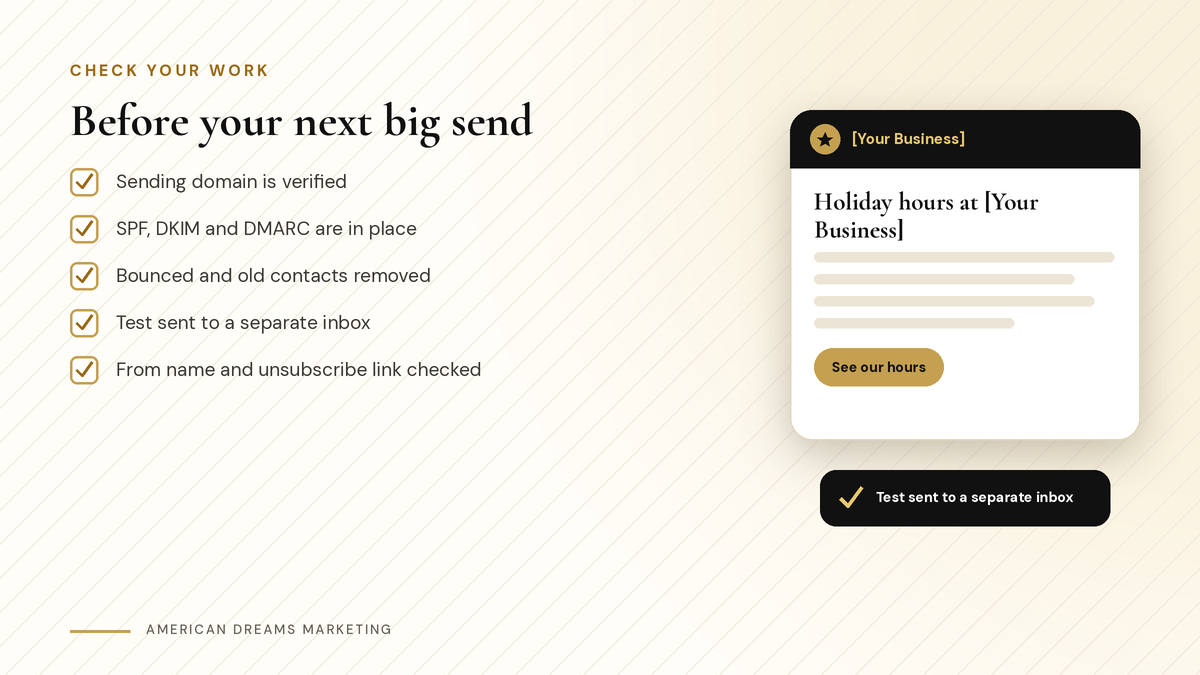
Five quick checks before a holiday promo or a big batch of reminders.
Once you send enough mail, Google Postmaster Tools, free from Google, shows your Gmail reputation, spam reports, authentication results and delivery errors.
What is normal: No one can promise the inbox
Even careful senders get some mail filtered. Every inbox provider makes its own call. These steps give your email a fair shot.
Not sure how your emails are sent today? Book a free discovery call and we will look at your setup together.
Frequently asked questions
Why are my business emails going to spam?
Usually because inbox providers cannot confirm the mail is from you. Common causes are a free Gmail or Yahoo sender address, missing SPF, DKIM or DMARC records, an unengaged list and sudden volume jumps.
What is a dedicated sending domain?
It is a sub-domain of your website, like mail.yourbusiness.com, that your emails are sent from. It ties your mail to your own brand instead of a shared server that can show "sent via" another name.
Will a sending domain break my regular email?
It should not, as long as you only add the records the setup asks for. Never delete your existing MX records, because they route the mail coming into your inbox.
How long does setup take?
The steps are quick, but DNS changes can take up to a day to show. After that, warm the domain up with small sends and grow your volume steadily.
Can I keep sending marketing email from my Gmail address?
It is better not to. Free Gmail, Yahoo and Outlook addresses often fail checks when used through a sending service, because those providers do not let other servers send as them. Use your own domain.
Can American Dreams Marketing set this up for me?
Yes. We set up your dedicated sending domain on the American Dreams platform, help verify your DNS records, assign domains to your email types and walk you through warm-up before your next big send.
Get your emails into the inbox
We set up dedicated sending domains and email authentication on the American Dreams platform, so your promos, reminders and invoices come from your own name. Book a free discovery call and we will look at yours.
