AI Agents for Small Business: What Grok Bot and Muse Can Do, and How to Stay in Control
A newer kind of AI tool can take the steps for you, not just answer questions. Here is what agents are good for, the one rule that keeps you safe, and two beginner guides to get started.
Key takeaways
An agent plans and carries out multi-step work: reading files, browsing, drafting and running scheduled jobs.
Reversible work can happen automatically. Irreversible work waits for a human yes.
Adopt in stages: read-only, then drafts, then routines, with gates always on.
Grok Bot for Beginners ($19.99) and Muse for Beginners ($17) show you how, step by step.
For the last few years, using AI has mostly meant chatting with it. You ask a question, it gives you an answer, and then you do the rest: copy the text, open your email, paste, send.
That is starting to change. A newer kind of tool, the AI agent, can take the steps for you. You describe the outcome you want, and the agent plans the work and carries it out: reading files you share, browsing websites, filling in forms, drafting documents and emails, and running jobs on a schedule. For a small business owner, that is a big deal. It is also a reason to slow down and learn how to use agents safely.
Chat assistant vs. AI agent
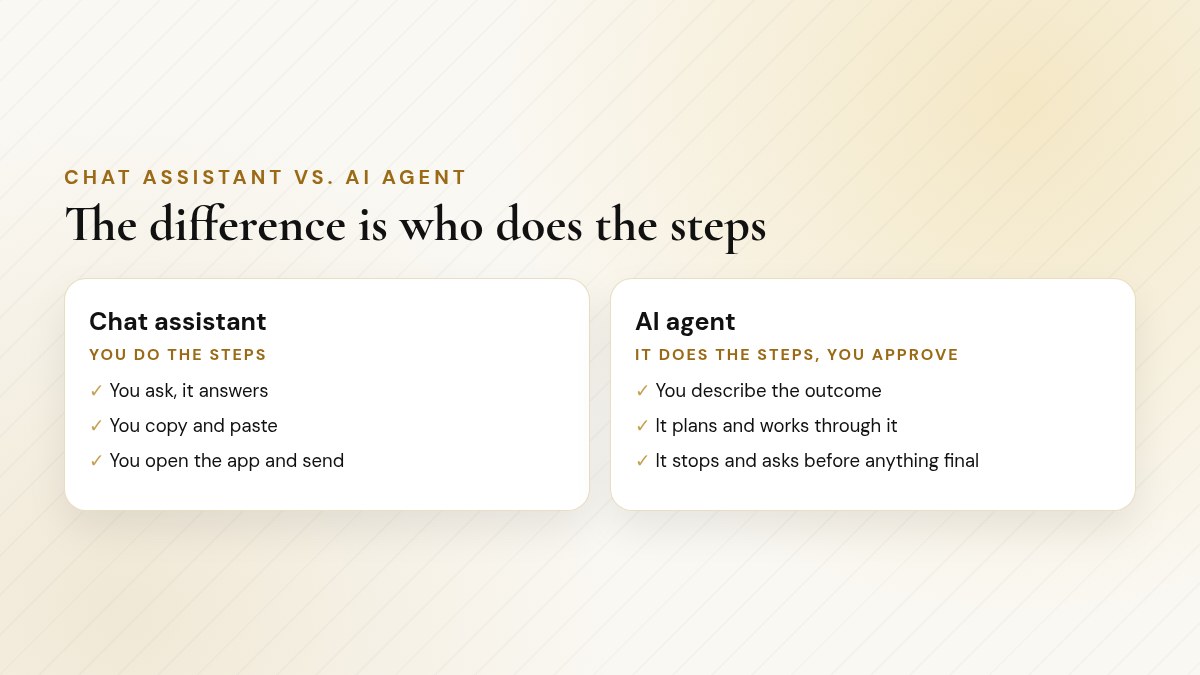
With an agent, your job shifts from doing every step to briefing and approving.
A simple way to think about it: a chat assistant is like a smart advisor. An agent is more like a capable assistant who prepares the work, so you only have to make the decisions.
In 1950, Alan Turing opened his paper "Computing Machinery and Intelligence" with the question "Can machines think?" and proposed what became known as the Turing test.
Source: Mind journal (Oxford Academic)
What an agent can do for a small business
The best agent jobs are the repetitive, multi-step chores that pile up every week:
Job type | Example for a small business |
|---|---|
Preparing | Gathering information and drafting, so you just review |
Repeating | A Monday summary of your inbox and calendar, or a weekly report |
Looking things up | A research pack on suppliers, competitors' public prices or local events, with sources |
Checking | Comparing two documents, or spotting what is missing from a quote |
Organizing | Turning scattered notes into a spreadsheet or a clean document |
Heads up: What agents are not good at
Judgment about people, risk and money; anything that cannot be undone; and your unwritten rules, until you write them down for it.
The one rule that keeps you safe
Both of my agent guides are built around this:
Reversible work can happen automatically. Irreversible work waits for a human yes.
Reading, summarizing, drafting and saving a copy are reversible. Sending an email, posting publicly, paying, deleting and sharing a file are not. Good agents have approval gates for exactly those moments. The guides show you how to check them, and why to keep them on.
〉 Try this brief
Here are tasks I do each week: [list]. Sort every step into reversible (read, summarize, draft, copy) or irreversible (send, post, pay, delete, share). For each irreversible step, say where an approval gate should go.
Gmail's Undo Send lets you set a cancellation window of 5, 10, 20 or 30 seconds: a small, built-in example of making an irreversible action briefly reversible.
Source: Gmail Help
Grok Bot and Muse at a glance
Grok Bot | Muse | |
|---|---|---|
What it is | Described by its publisher as a desktop AI agent that works with connected files and apps | Meta's personal AI agent, launched September 2026 |
Approvals | Asks for approval before irreversible actions, per its publisher | Can make purchases with your approval; approvals and permissions covered in depth |
Typical jobs | Briefs, research packs, inbox and calendar summaries, routines | Drafting content, documents and spreadsheets, reminders, scheduled tasks |
Availability | Confirm capabilities in your own installation | Not yet available everywhere; confirm in your account |
Beginner guide | 85 pages, 150+ prompts | 62 pages, 140+ requests |
Price | $19.99 | $17 |
Grok Bot for Beginners
Covers what a desktop agent is and what to confirm in your own installation; step-by-step setup and connecting accounts with the least access needed; how to write a clear brief; files, the browser and research, email and calendar; approvals, routines and schedules, helper "teammates" and memory; agent security in plain English; and a 30-day plan.
Muse for Beginners
Covers setup, plans and access, approvals and permissions, and your data and privacy; skills, connectors, the Muse browser, payments, artifacts and scheduled tasks; requests for ten kinds of business, 26 quick wins and a worked "week with Muse"; and ten safe-agent rules, troubleshooting and a 30-day plan. It was checked against Meta's own Help Center and announcements in October 2026, and flags anything you should confirm in your account.
Grok Bot for Beginners ($19.99)Muse for Beginners ($17)
Instant-download PDFs · Secure checkout on Payhip
How to start with an agent, safely
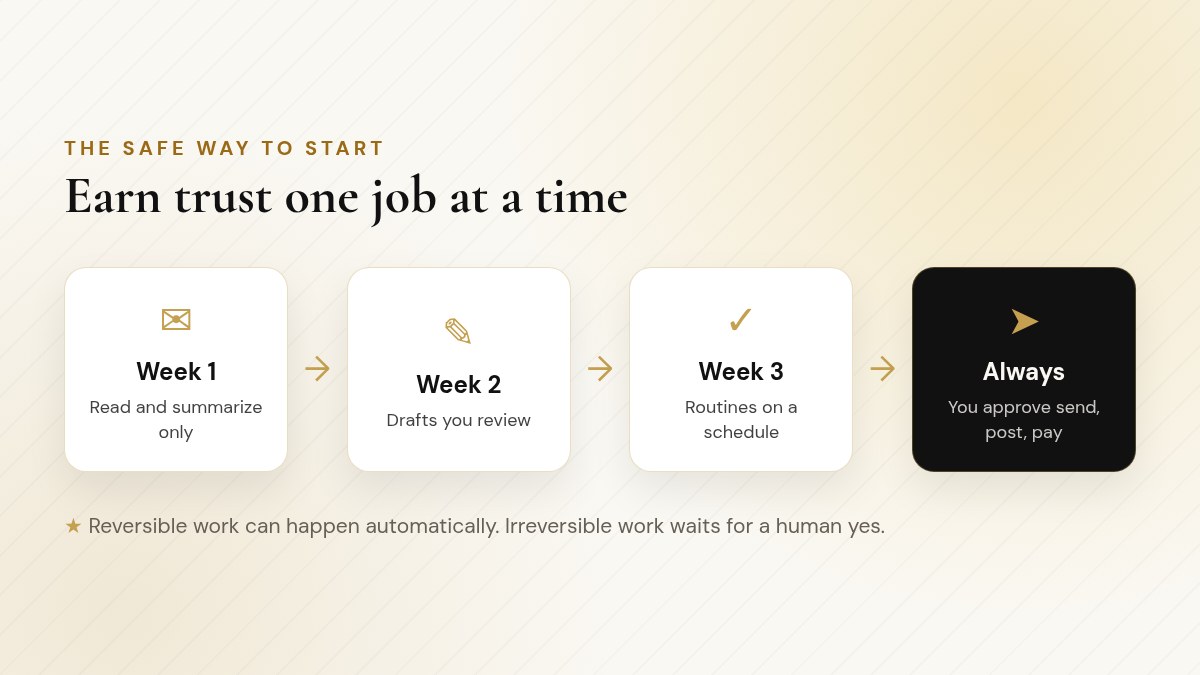
Start with read-only jobs and widen access only as trust builds.
Start read-only Ask it to summarize and organize, not to send or change anything.
Move to drafts Let it write emails and documents that you review and send yourself.
Add routines Once you trust its drafts, schedule repeat jobs like a weekly summary.
Keep the gates Sending, posting, paying and deleting always wait for your yes.
Checklist
Agent safety checklist
Connect only the accounts and folders a job actually needs
Confirm which actions require your approval in your own setup
Keep a short playbook file with your rules and never-do list
Check the first few results of every new job closely
Review scheduled routines regularly and switch off ones you no longer need
Pro tip: Write the brief like you would for a new hire
Say what done looks like, what it may use, what it must not touch, and where it should stop and wait for you. Clear briefs make agents dramatically more useful.
Three starter jobs, briefed
Here are three low-risk jobs that suit most small businesses, written as short briefs. Each one is reversible: the agent prepares, and you decide.
1. The Monday summary
Ask the agent to read your inbox and calendar for the week ahead and produce a one-page summary: meetings, deadlines, customers waiting on a reply and anything that looks urgent. It drafts; it does not reply.
2. The competitor snapshot
Ask it to look up the public prices, hours and services of three local competitors and put them in a simple table, with a link to each source so you can check every line.
3. The quote checker
Give it a supplier quote and your original request, and ask it to list anything missing, unclear or different from what you asked for, plus the questions to send back. You send the questions yourself.
Once those run smoothly for a few weeks, you can schedule the first one as a routine. That is the read-only, drafts, routines path in practice.
Learning more than one tool?
If you would like to compare agents with chat assistants, the AI Beginners 5-Pack ($59) includes all five of my beginner guides: ChatGPT, Claude, Grok Bot, Gemini and Muse for Beginners. And if you want a complete business reference too, The Complete AI Bundle ($79) includes The AI Bible (about 195 pages, 520+ prompts, including a chapter on agents and automation) plus those same five beginner guides.
Beginner guide
Grok Bot for Beginners
Getting started with Grok Bot, with prompts for research, content ideas and small business.
85 pages, 150+ numbered prompts for ten kinds of business
Writing clear briefs, connecting accounts with the least access
Approvals, routines, memory and agent security in plain English
30-day plan, worksheets, glossary and prompt index
$19.99Get Grok Bot for Beginners ($19.99)
Instant-download PDF · Secure checkout on Payhip
Beginner guide
Muse for Beginners
Getting started with Meta's Muse AI and prompts for creating content and ideas.
62 pages, 140+ numbered requests for ten kinds of business
Setup, approvals, data controls and payments explained
26 quick wins and a worked "A Week With Muse"
Ten safe-agent rules and a 30-day plan
$17Get Muse for Beginners ($17)
Instant-download PDF · Secure checkout on Payhip
AI Beginners 5-Pack ($59)The Complete AI Bundle ($79)
Instant-download PDFs · Secure checkout on Payhip
You do not need to hand an agent your whole business. Start with one boring, reversible job and see how much time comes back. Then add the next one.
Frequently asked questions
What is an AI agent?
An AI tool that plans and carries out multi-step work toward an outcome you describe, such as reading files, browsing, filling in forms, drafting documents and running scheduled jobs, rather than only answering questions.
Is it safe to let an agent act for my business?
It can be, with the right setup. Keep approval gates on for irreversible actions (sending, posting, paying, deleting, sharing), give it the least access needed and start with read-only jobs.
What is the difference between Grok Bot and Muse?
Grok Bot is described by its publisher as a desktop AI agent that works with connected files and apps. Muse is Meta's personal AI agent, launched in September 2026, which can browse, create documents and run scheduled tasks with your direction.
What should an agent never do without me?
Send emails, post publicly, make payments, delete things or share files. Those should always wait for a human yes.
How much are the agent guides?
Grok Bot for Beginners is $19.99 and Muse for Beginners is $17. Both are included in the AI Beginners 5-Pack ($59) and The Complete AI Bundle ($79).
Is Muse available everywhere?
Not yet. Meta says some features may not be available in your area, so confirm in your own account.
Want an AI assistant answering your phones?
My agency sets up AI assistants that answer calls, text back missed callers and help run your day, through the American Dreams platform. Book a free discovery call and we will look at where it fits your business.
